GUIDESTEAM BUILDING
Company event with gun turrets: an internal approval brief you can copy
Give the person approving your company event a proposal they can act on. This brief puts the physical experience, the private arena window and your company's plan on one page. It works for a remote Christmas party, a whole-company social or a day when departments drop in between work.
What the budget request needs
Name the company event, describe the real gun turrets, select a private duration and give its total in USD. Add the proposed date, start and end with a named time zone, expected audience, organiser and payment owner. Attach actual gameplay footage, then confirm availability in the booking calendar before paying.
Describe what colleagues will actually do
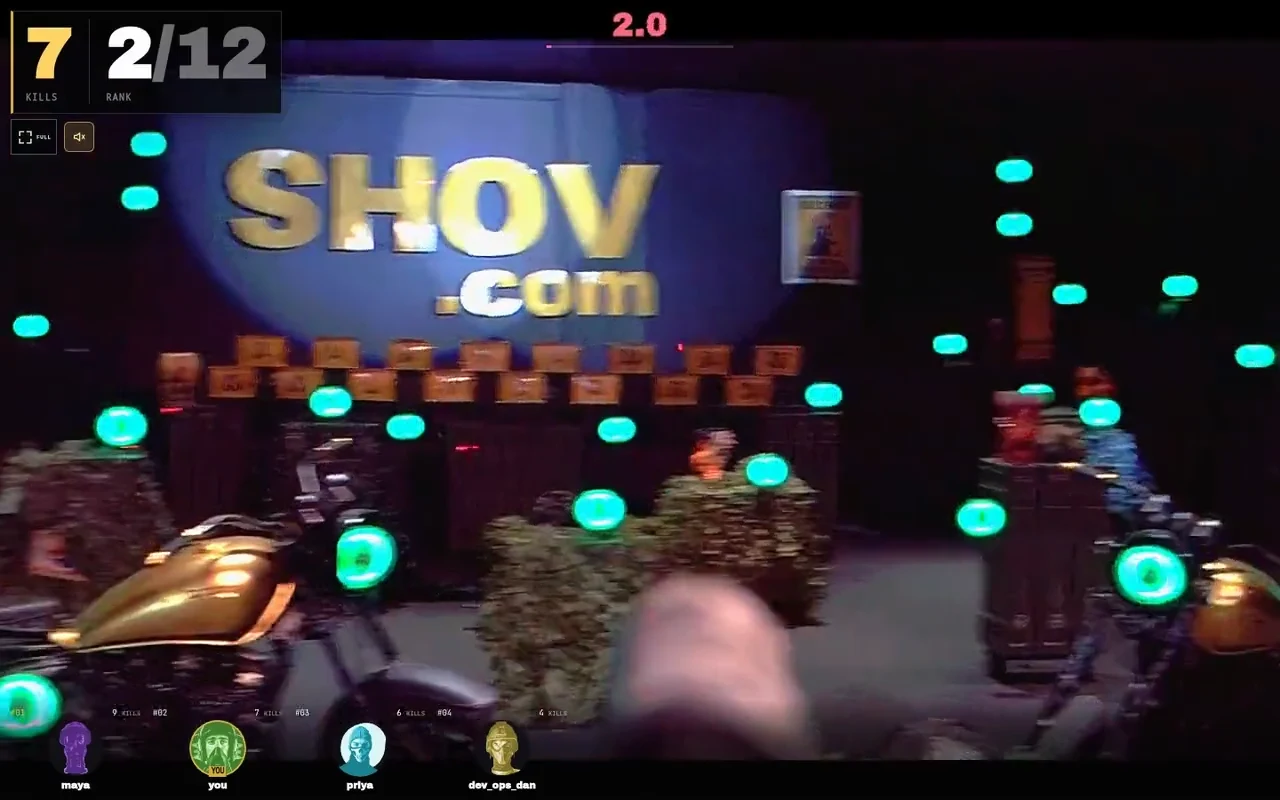
Shov is a real gun turret range controlled from each player's phone or laptop browser. Colleagues click or tap green targets; the gun turrets turn and fire less-lethal .68 caliber rounds. Up to 12 players compete in each 90-second match, and a sensor-confirmed impact on an active green target counts as a kill.
For a whole-company day, propose a four- or eight-hour private window alongside the working day. Departments can gather between meetings, join the same physical range and return for more rounds. Your company chooses its gathering times and hosts; describe those as your event plan.
Give one selected package and a clear total
| Private arena window | Public package total, USD | Arena matches |
|---|---|---|
| 1 hour | $2,000 | 40 |
| 4 hours | $4,000 | 160 |
| 8 hours | $7,000 | 320 |
Choose the package your proposal uses instead of asking the approver to pick from a pasted rate card. Name USD explicitly. If your company needs a home-currency budget, finance can add its own dated conversion and any payment-provider charges separately from Shov's package total.
Copy this internal request
Approval requested: [company event] with Shov. We propose [selected duration] of private access to a real gun turret range on [date], from [start] to [end] in [named time zone]. Colleagues join and control gun turrets from their own browsers. The current public package total is [selected package total] USD. Expected audience: [people or departments]. Organiser: [name]. Payment owner: [name]. Our programme: [one shared social or department gathering times across the day]. Gameplay example: https://shov.com/groups/player-web.mp4. After internal approval, [organiser] will check the live calendar and complete booking and payment at https://shov.com/groups#plan. We will then send the participant event link with the confirmed times.
Replace every bracket before sending the request internally. A proposed date in this message is a company preference; calendar availability is checked during booking. Keep the booking confirmation and the final participant invitation aligned if you choose a different available start.
Separate the audience from the play capacity
Back-to-back 90-second matches across 12 gun turrets provide 480 player slots per hour, including repeated turns. Put your expected audience in the brief as a planning figure. Slots are not distinct attendees, and an individual player's turns depend on when they join and rejoin.
| Include in the proposal | Who supplies it |
|---|---|
| Private duration and current package total | Shov's booking page |
| Expected audience and department gathering times | Your company organiser |
| Date, start, end and named time zone | Your proposal, confirmed against the booking calendar |
| Payment owner and any internal approval reference | Your company |
| Company call or chat for conversation | Your company host |
Turn the approved brief into an invitation
- Choose the private duration, date and an available start on Shov for Groups.
- Complete verified-email checkout and payment using the company-approved arrangement.
- Use the resulting participant event link in your invitation, with the confirmed start, end and named time zone.
- Name the company host and any department gathering times. Each player controls the game in their own browser; your company can supply a shared call for conversation.
FAQ
Is the package price multiplied by our headcount?
The current public packages have a fixed total for the selected private duration. Enter your expected audience for planning; the duration determines the package total.
Does sending the internal request reserve a date?
The request is your company's planning document. Check available times and complete booking and payment through Shov for Groups.
Can we use this for a company Christmas party?
Yes. Name your year-end event in the brief, choose a shared social or a longer company day, and add your own department gathering times.
What should we attach to explain the game?
Use the real gameplay recording on this guide. It shows a player's browser controlling the gun turrets and the recorded match interface.