GUIDESTEAM BUILDING
Company event recap with gun turrets: a template for your video and results
A whole-company arena day creates moments that colleagues arriving at different times can revisit together. Use the event's delivered recap and leaderboard to close the programme in your company channel. This organiser's workflow gives you a message, an asset checklist and a clear way to describe the results.
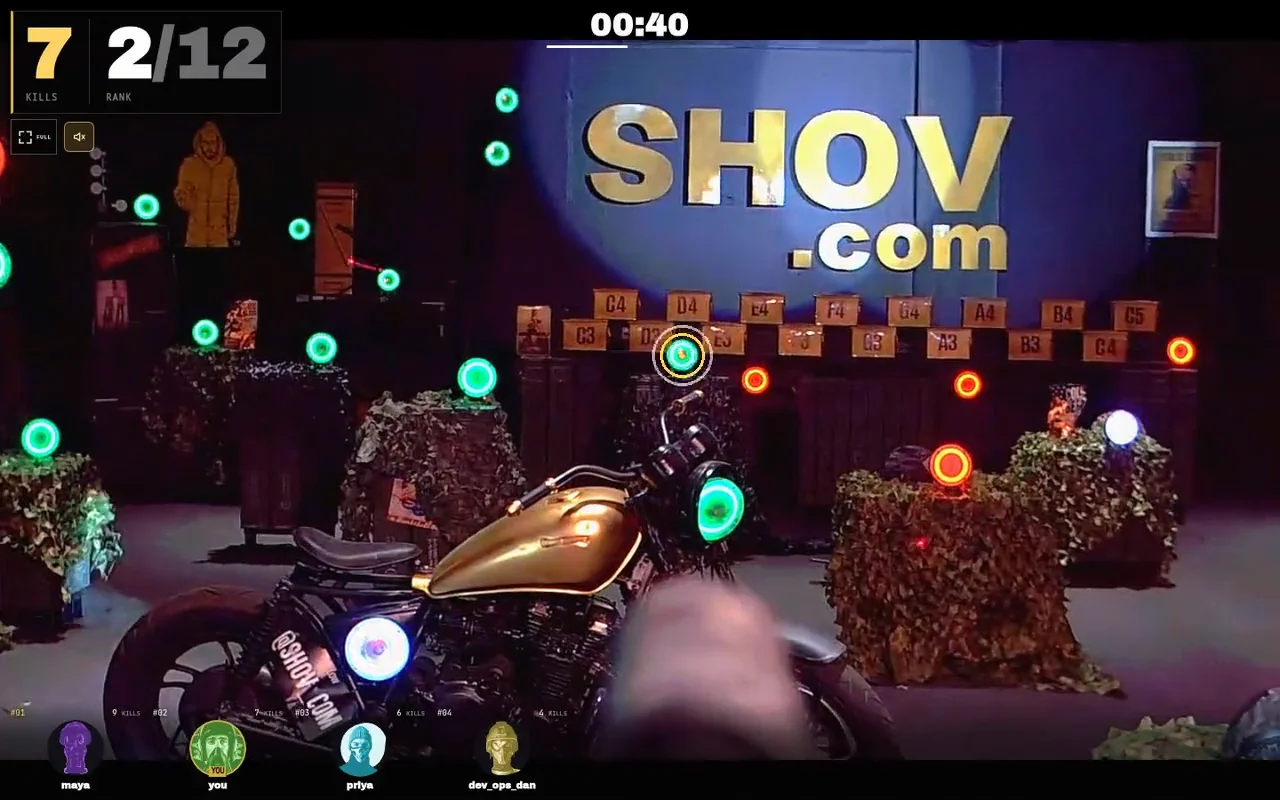
What to put in the recap
Start with the company event and its actual date, link the delivered event recap, add a verified leaderboard result and thank the people who ran the day. If you report participation, distinguish distinct players from repeat turns. Keep any department competition in a separate organiser-owned table.
Start with the delivered assets
Shov sends the organiser an event recap email when its recap video, poster and leaderboard image are available. It contains a recap page, a downloadable landscape video and a leaderboard download. Use the links from your own event's email. Plan your company post around those delivered assets rather than promising a particular delivery time.
| Asset | Use in your company recap | Check before posting |
|---|---|---|
| Event recap page | One place for colleagues to watch the event recap | It opens the correct company's event |
| Landscape recap video | Play in an all-hands or share in your company channel | Use the delivered download and preview it |
| Leaderboard image | Show the event's recorded standings | Copy names and results exactly |
| Your own department score sheet | Report a competition your company organised | Use your announced scoring rule and final cutoff |
Keep the result attached to its source
Copy a winner's display name and result from the final event leaderboard. If your company ran its own competition, name that competition and link your final score sheet. An event leaderboard position and a company team result are different measurements; give each its own label.
Up to 12 players control gun turrets in each 90-second match. Back-to-back matches provide 480 player slots per hour, including repeat turns. That capacity is not an attendance count. Use a distinct-player figure only when the event results or your checked attendance record supplies one; otherwise leave the number out.
A message you can fill in
Thanks for joining [company event] on [actual date]. We played real gun turrets together from [participating offices and remote locations]. Watch our delivered event recap: [event recap page]. Event leaderboard: congratulations to [verified display name and recorded result]. [Optional: Our separate department competition finished with result; final score sheet link.] Thank you to [organisers and hosts]. [Optional: distinct-player count and its source.]
Replace every bracket and remove unused optional sentences. For an eight-hour drop-in day, mention the offices and departments that actually took part, using your event record. The recap can bring the different visits into one company story without claiming everyone played in the same match.
Describe the physical experience in one sentence
For colleagues who missed it: Shov is a real gun turret range controlled through each player's phone or laptop browser. Players click or tap green targets; the turret turns and fires less-lethal .68 caliber rounds. A sensor-confirmed impact on an active green target counts as a kill in a 90-second match.
Save a useful organiser note for next time
- Record the paid window's actual date, start, end and named time zone.
- Keep the final event recap and leaderboard links together with your company message.
- Note the host handover and department gathering times you used, plus any changes you would make.
- If you propose another event, quote the current package rather than reusing a historical invoice as today's price.
| Private window | Current public total, USD | Arena matches |
|---|---|---|
| 1 hour | $2,000 | 40 |
| 4 hours | $4,000 | 160 |
| 8 hours | $7,000 | 320 |
An hour can bring everyone together for a social; four or eight hours can run alongside a company programme with departments dropping in between work. Choose the date and an available start time on Shov for Groups. After verified-email checkout and payment, use the resulting participant event link for the invitation.
FAQ
Where does the organiser get the recap?
The event recap email supplies the recap page and downloads when the video, poster and leaderboard image are available. Use the links delivered for your event.
Does 480 player slots mean 480 different colleagues attended?
No. Player slots include repeated turns. A distinct-player count needs its own event or attendance record; capacity alone cannot supply it.
Can we report our own department competition?
Yes. Label it as your company's competition and use your final score sheet. Keep it separate from Shov's event leaderboard.
Is the sample footage our company's recap?
The footage on this guide shows a recorded Shov match. Your own company's recap is the asset delivered for that event.