GUIDESTEAM BUILDING
A bug-bash and demo day with real gun turret breaks
Keep your engineering day in the office and open a private gun turret range alongside it. Engineers, QA, product, support and colleagues at home can finish a testing pass, play a few rounds, then return to triage or demos. A whole-company booking gives every department the same competition throughout the day.
An engineering day with gun turret breaks
Book a private gun turret arena for 5 or 10 hours alongside your company bug bash. Staff join from their own browsers between testing passes, triage and demos. Each match lasts 90 seconds and seats up to 12 players. Your organiser runs the engineering plan while the range runs back-to-back matches throughout the booked window.
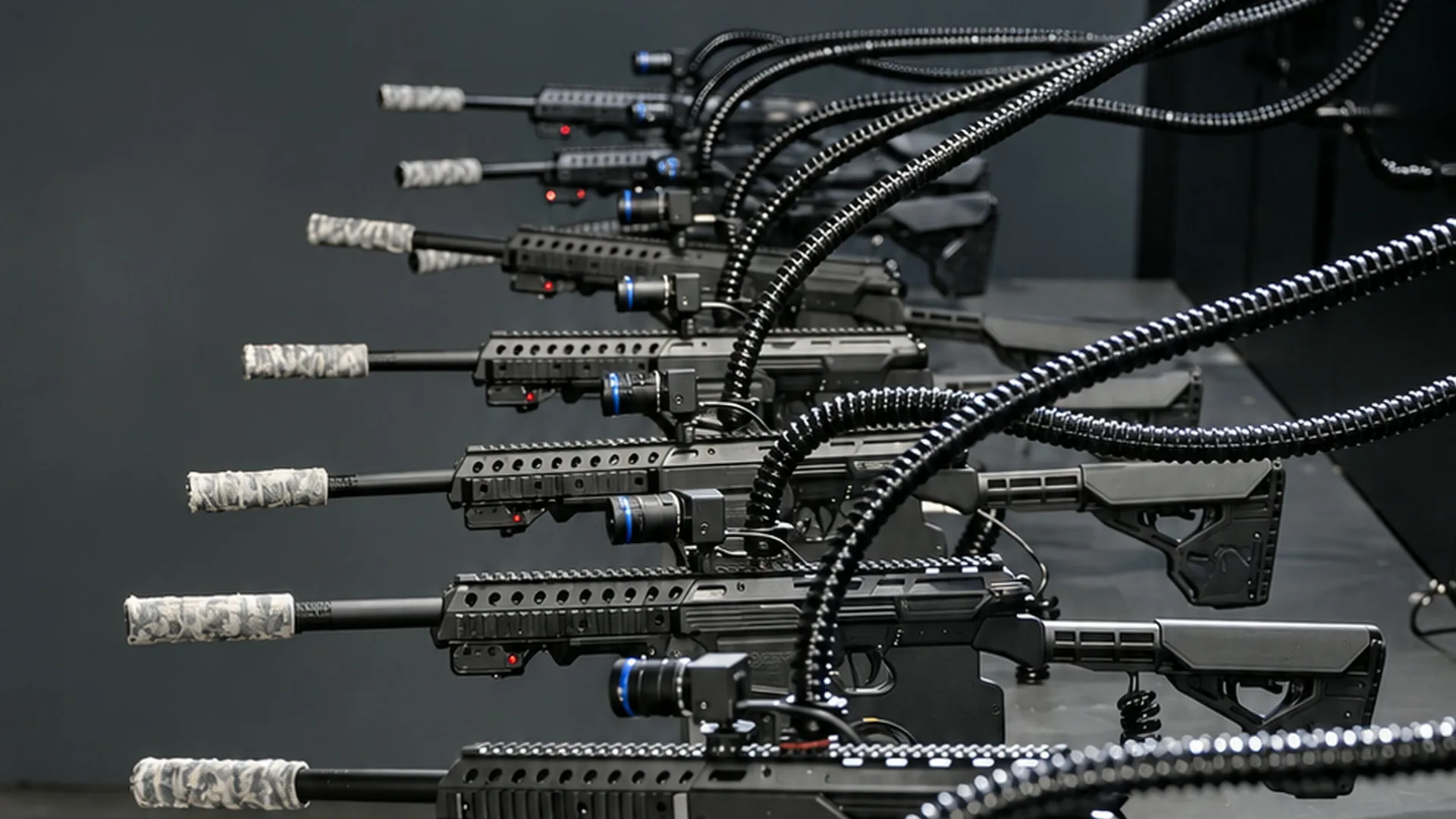
In Shov, each person controls a real gun turret at the US range through their own phone or laptop browser. The turrets fire less-lethal .68 caliber rounds at sensor targets. Clicking or tapping an active green target aims the turret and fires; confirmed impacts count in the match.
Make the engineering plan concrete before kickoff
Choose a build and a small set of journeys to explore: account creation, a purchase, permissions or an interrupted connection. Put the build identifier, expected result, reproduction steps and evidence fields in your issue template. Name a triage owner who can combine duplicate reports and assign follow-up owners. The organiser prepares this work in the company’s own tracker.
Use two records: issues and decisions in the tracker; gun turret results on Shov’s company leaderboard. Invite support colleagues to contribute the awkward customer paths they know, and invite product to the demo. This makes the day a company event with a specific piece of work at its centre.
A report template for the first testing pass
- Build and journey: which version you tested, the starting account state and the task you tried.
- Reproduction: the shortest sequence of actions that shows the problem, plus the expected and observed results.
- Evidence: a screenshot or recording, the time of the observation and any relevant error message.
- Follow-up: the triage owner, the person preparing a fix and the person who will retest it.
Example: 200 colleagues, a range open from 09:00 to 19:00
This is a proposed office programme inside a 10-hour booking. Work-block times belong to your organiser. Staff with the invitation can drop into the arena throughout the booked window; the range keeps running during testing, lunch and demos. Name the local time zone in the invitation.
| Local time | Engineering work | Arena invitation |
|---|---|---|
| 09:00–09:20 | Show the build, scope and report template | Share one arena link in the day’s channel |
| 09:20–10:45 | First exploratory pass in cross-functional pairs | Visit after finishing a test journey |
| 10:45–11:15 | Triage duplicates and choose reproductions | Colleagues outside triage play and return to work |
| 11:15–12:30 | Reproduce selected issues and prepare fixes | Return for more rounds between tasks |
| 12:30–13:30 | Lunch and informal walkthroughs | Same private arena remains open |
| 13:30–15:00 | Second pass on fixes and related journeys | Visit after completing a pass |
| 15:00–16:00 | Short demos: finding, change, result | Play between demo sessions |
| 16:00–17:00 | Retest, record owners and publish the work recap | Post the company leaderboard |
| 17:00–19:00 | Later teams finish their work and visit | Keep the full purchased window available |
Players rotate automatically through the lobby. After a match they return to the lobby and sit out the next match before joining again. Share the same link with office and home workers so people return whenever their work allows.
Price the day and the shorter alternative
| Private arena | Total, USD | Matches | Player slots |
|---|---|---|---|
| 5 hours | $8,000 | 200 | 2,400 |
| 10 hours | $14,000 | 400 | 4,800 |
The range offers 480 player slots an hour through 40 back-to-back matches. Large and whole-company groups can share the arena across the day, with staff dropping in between work blocks.
For a shared afternoon, the current 200-person session quote is $5,000, or $25 per person, for 100 matches and 150 minutes. The calculator estimates about 6 matches per person under its rotation model. A 100-person quote is $3,000, with 60 matches over 90 minutes.
A session priced by headcount has a $500 minimum for the whole session; an extra match costs $50. Prices are in US dollars. The planner shows the actual quote and availability. A 5- or 10-hour pass is a fixed arena booking for visits throughout the day.
Send an invitation people can use
Our bug-bash build, issue template and demo agenda are in the engineering channel. Our private gun turret arena is open 09:00–19:00 in [named time zone]. Join from your phone or laptop between testing passes and demos, compete with colleagues and come back for more rounds. The arena link and the build link are both in this invitation.
Shov supplies the private arena, matches, AI announcer and company leaderboard. Your team runs the testing plan, issue triage and demos. Each player uses a supported browser—Chrome, Safari, Edge or Firefox—and a stable connection. Put a real arena replay in the announcement so colleagues see the hardware and match format.
FAQ
Can the whole company join?
Yes. A day booking suits engineering, product, support and other departments dropping in between work. Colleagues at home use the same invitation and browser controls.
Does the arena decide who tests which feature?
Your organiser puts that plan in your own work tools. Shov runs the gun turret competition and lobby rotation.
What does a private arena day cost?
5 hours costs $8,000 and includes 200 matches. 10 hours costs $14,000 and includes 400 matches. These are private arena totals in USD.
What do we share afterwards?
Publish the tracker’s issue and follow-up summary in the engineering channel. Shov provides the organiser with a recap video, event page and leaderboard image after the session; players receive their highlights by email after matches.