GUIDESTEAM BUILDING
A hybrid team event with gun turrets: the office and remote host plan
Give the office and remote colleagues the same place to play, then give each group a host. This hybrid-event plan keeps the game on each person's own device and the conversation in one company call. It works for a shared social hour or a whole-company arena day with several offices dropping in.
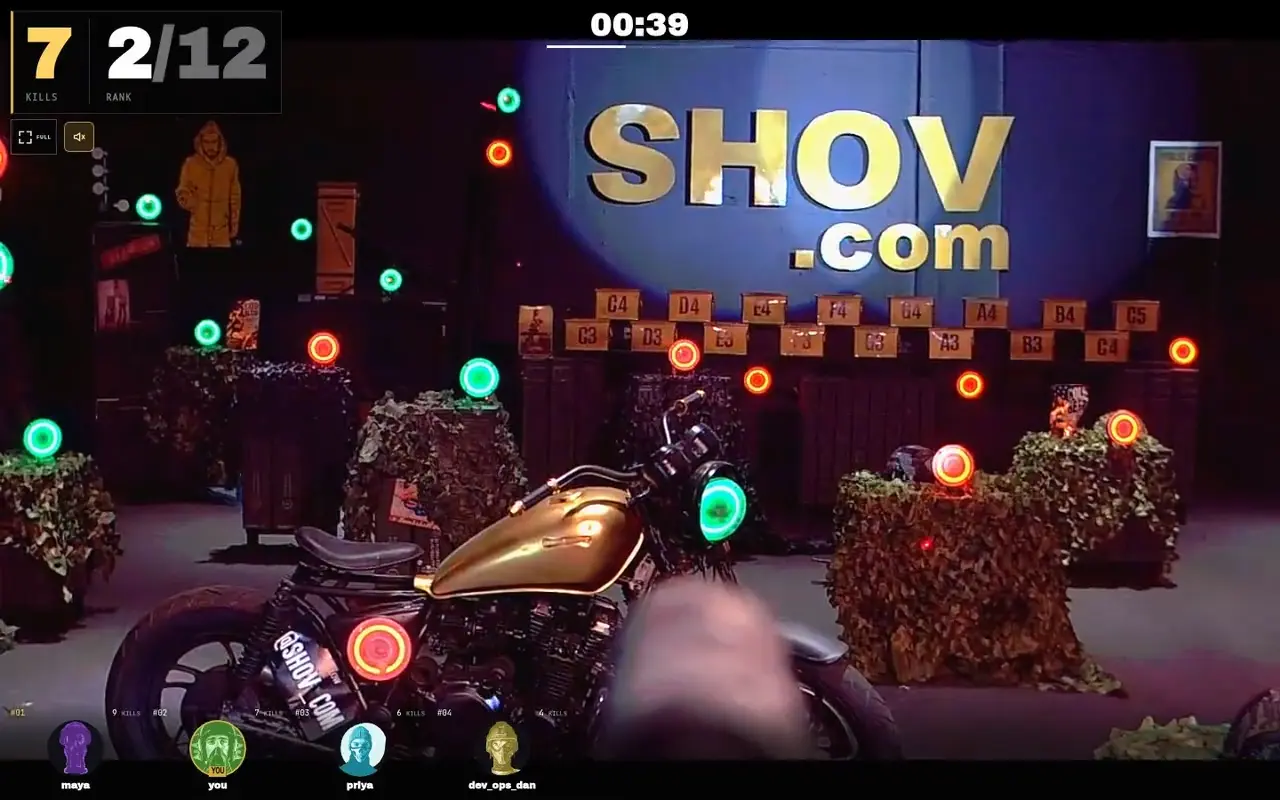
The hybrid setup
Book a private Shov arena window, send its event link to office and remote colleagues, and have everyone play from their own phone or laptop browser. Use a separate company call for conversation. An office host handles the room; a remote host handles the call. Up to 12 people control gun turrets in each 90-second match.
Two hosts, one event link
The organiser names one office host and one remote host before sending the invitation. These are company roles, not staff supplied by Shov. The office host puts the call on the room display and gives the opening instructions. The remote host welcomes colleagues in the call, repeats any room announcement and watches the company chat for questions. For several offices, give each room its own local host and keep one remote host for the shared call.
| Surface | What it is for | Who handles it |
|---|---|---|
| Each person's browser | Joining the event and aiming their own gun turret | Every player |
| Company call and chat | Conversation, welcome and questions | Remote host |
| Office display | Showing the call, a player's shared browser or event leaderboard | Office host |
| Optional company score sheet | A separate department or team competition | Organiser |
Show the physical game before explaining the programme
Shov is a real gun turret range. Players click or tap green targets in their live browser view and the turret turns and fires less-lethal .68 caliber rounds. A confirmed impact on an active target counts as a kill. Each match lasts 90 seconds; the next match starts with no gap. After playing, a colleague returns to the lobby and sits out the next match before queueing again.
The event runs in Chrome, Safari, Edge or Firefox. Players need their own browser and a stable connection; there is no app or activity kit to distribute. Decide which room device carries the company call's audio so colleagues know where to speak. That audio setup belongs to your call, while game control stays on each player's device.
A handover plan the hosts can use
| When | Office host | Remote host |
|---|---|---|
| Before the booked start | Open the company call and display the invitation; players have their devices ready | Open the same call and pin the event link in the company chat |
| At the booked start | Ask everyone to open the paid booking's event link; joining opens now | Repeat the instruction in the call and chat |
| While matches run | Repeat announcements into the call and invite people to requeue after their sit-out match | Welcome arrivals and relay remote questions to the room |
| At an office or host change | Name the next host in the shared call | Restate the booked end time and keep the same event link pinned |
| At the booked end | Close with the event leaderboard | Thank colleagues in the call; share the organiser's recap when it arrives |
For a whole-company day, publish several suggested department gathering times within the same window. Those times are invitations from the organiser, not automatic player assignments. People can return later and compete again. The arena has 480 available player slots per hour, including repeat turns; that is capacity, not a count of distinct colleagues or a guarantee of individual turns.
Invitation copy for both audiences
Our next company social is a private gun turret event. Office and remote colleagues use the same event link and play from their own phone or laptop. Join the company call for the welcome and conversation. Event: [paid booking link]. Call: [company call link]. Window: [date, start, end and named time zone]. Office host: [name]. Remote host: [name]. Come back for more rounds throughout our booked window.
Replace every bracket before sending. Include the local date and times for each invited office, especially where the calendar day differs. A company's video call is separate from the paid booking's event link. If access is restricted to company email domains, tell colleagues to join with their verified work email.
Choose the window for the company programme
| Private window | Public total, USD | Arena matches |
|---|---|---|
| 1 hour | $2,000 | 40 |
| 4 hours | $4,000 | 160 |
| 8 hours | $7,000 | 320 |
Use an hour for one shared social, four hours for an afternoon across several offices, or eight hours for colleagues dropping in between work. Choose the window, date and an available start time on Shov for Groups, then complete verified-email checkout and payment. Use the resulting event link in the invitation. Availability is shown in the booking calendar; the arena operates 24/7.
For a department competition, publish your own scoring rule and cutoff before the event. Keep that company-owned table separate from Shov's event leaderboard, and name the organiser who will collect and verify results.
FAQ
Can the office and remote colleagues play together?
Yes. Both open the same paid event link in their own browsers during its booked window. Each match has up to 12 players controlling real gun turrets.
Does everyone control the game from the shared display?
No. Each player controls their turret from their own browser. A shared display can show the company call, a player's shared browser or the event leaderboard.
Does Shov provide our company call hosts?
The two hosts in this plan are people named by your organiser. Your company supplies its call and chat; Shov supplies the private arena and game.
Can the host pause matches for announcements?
This plan does not pause or reserve matches for announcements. Matches continue throughout the booked window, so hosts make their welcome and handovers alongside play.