GUIDESTEAM BUILDING
A gun turret league for a distributed company: every office and home desk in one arena
A distributed company rarely finds one activity that every office and every home worker can join at the same moment. Shov's private gun turret arena is that activity: colleagues in each office and at their kitchen tables control the same real gun turrets from their own browsers, compete head to head in short matches and climb one company leaderboard. Here is how to run it as a league.
The short answer
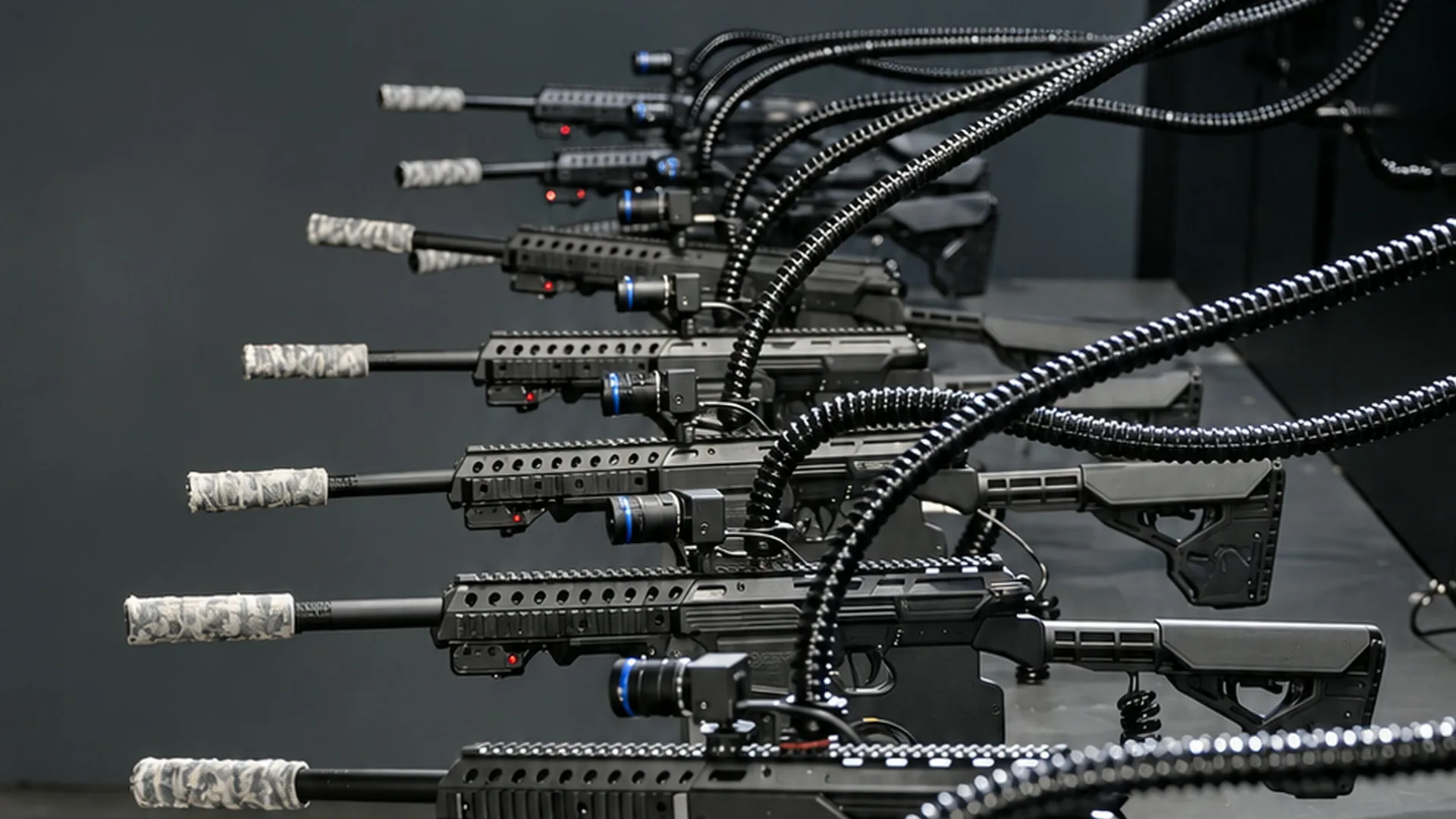
Book Shov's private gun turret arena and invite every office and remote employee to the same event. Each person controls a real gun turret from their own browser; the gun turrets fire less-lethal .68 caliber rounds at sensor targets. Up to 12 people play each 90-second match, and one company leaderboard ranks everyone.
- gun turrets in every match
- 12
- per match, back to back
- 90 s
- player slots an hour
- 480
- session minimum
- $500
One arena for every office and every home desk
A distributed company's usual options split the group. An offsite gathers the people who can travel; a video-call game brings the group to a shared screen. A Shov booking gives every employee the same controls. Each person opens the event invitation on their own phone or laptop, controls a real full-auto pneumatic gun turret at the US range from that browser and fires less-lethal .68 caliber rounds at sensor targets. Colleagues sitting together in an office and colleagues at home play in the same match, on the same terms.
The leaderboard is company-wide, so a support agent working from home competes directly with the engineering office and the sales floor. Players click or tap active green targets, and confirmed projectile impacts count as kills. A live AI announcer calls the match, and every player receives highlight reels by email after their matches.
League formats your organizer can run
Shov runs the matches and ranks every player on the company leaderboard. Your organizer decides how to turn that into a league. The formats below are plans you manage in your own channels and documents, not settings inside the event.
- Office versus office. Name a scorekeeper in each office to record the players' confirmed match kills in your league document. Add the office totals there. Home workers form their own remote office or count toward the office they report to.
- Mixed squads. Draft every office and home worker into squads of 12, so each squad spans several locations. A squad scorekeeper records confirmed match kills in your shared league document.
- Season standings. Book a session each month, carry the standings forward in a shared document and crown the champion office at the all-hands.
- Challenge ladder. Any two colleagues in the same match are compared directly on that match's kills. Keep a challenge thread where people call out a rival for the next round.
Hybrid rooms: a shared office display plus individual controls
In each office, put the arena or the leaderboard on a shared screen so the room reacts together when a colleague lands a kill. Every player still aims and fires from their own device. Home workers open the same arena in their browser with the same controls, so the hybrid team plays one game rather than two.

Time zones: choose a window that includes every office
The arena runs 24/7 and the planner displays times in your own zone. For offices a few hours apart, choose a window that overlaps everyone's working day, or book an arena day so each of those offices plays during its own hours and the standings accumulate across the window. For more widely separated offices, compare a five- or ten-hour window with each office's local working hours. When the selected hours do not fit one window, book regional sessions and carry the standings across them in your league document. Name one reference time zone in the announcement so every office reads the same schedule.
What a league session costs for your headcount
Per-person sessions are priced by group size with a $500 minimum per session. Larger groups pay less per head and the booking contains more matches, so a whole-company league is the best-value format. Each match is one 90-second round of the full arena for your group.
| Group size | Per person |
|---|---|
| 2–19 | $50 |
| 20–49 | $40 |
| 50–99 | $35 |
| 100–199 | $30 |
| 200+ | $25 |
| People | Total | Per person | Matches | Session length | Matches per person |
|---|---|---|---|---|---|
| 30 | $1,200 | $40 | 24 | about 36 min | 9.6 |
| 80 | $2,800 | $35 | 56 | about 84 min | 8.4 |
| 250 | $6,250 | $25 | 125 | about 188 min | 6 |
Arena days for the whole company
For the biggest leagues, book the private arena for 5 or 10 hours. Staff in every office and at home drop in between work, play a match, and return for another attempt later in the day. Your organizer updates the shared league standings across the window; add regional sessions when the selected local hours require them.
| Private window | Fixed total, USD | Matches | Player slots | Capacity per person at 300 people |
|---|---|---|---|---|
| 5 hours | $8,000 | 200 | 2,400 | 8 |
| 10 hours | $14,000 | 400 | 4,800 | 16 |
What Shov runs and what your organizer runs
Shov supplies the private arena, the matches, the live AI announcer and the company leaderboard. Each player receives highlight reels by email after their matches; the organizer receives a recap video, event page and leaderboard image after the session. Your organizer sends the invitation, chooses the league format, records match scores in a shared document, posts league standings in the company channel and picks the window. Allowed company domains can also use verified email access to join.
Each player needs their own supported phone or laptop browser and a stable internet connection. Chrome, Safari, Edge and Firefox are supported.
FAQ
Can offices and home workers play in the same match?
Yes. Up to 12 people play each 90-second match, and it makes no difference whether a player sits in an office or at home. Everyone controls a real gun turret from their own browser and appears on the same company leaderboard.
How do we score office versus office?
Most confirmed kills wins a Shov match. Assign a scorekeeper in each office or mixed squad to record those match results in your shared league document, add the team totals and post them in the company channel. Shov supplies a company leaderboard; the office league tally is your organizer's plan.
How many people can join a league session?
Groups of 2 to 1,000 can book. Matches run back to back with no gap, so the arena provides 480 player slots an hour and everyone gets several turns. Larger groups pay less per person.
What does a session cost for 80 people?
$2,800 in total, or $35 per person. That buys 56 matches, about 84 minutes of play, and the full-match, evenly allocated rotation model averages 8.4 matches per person. Add matches at $50 each for a longer session.
Do all our offices need to be in the same time zone?
No. The arena runs 24/7 and the planner shows times in your own zone. Choose an overlapping window for offices a few hours apart, or an arena day that covers each of their working hours. Compare the selected five- or ten-hour window with each office's local hours. Add regional sessions when the chosen schedule requires them, with standings carried across in your league document.
Is this a video-call game?
No. Players control real full-auto pneumatic gun turrets at a US range, firing less-lethal .68 caliber rounds at sensor targets. The controls run in a normal phone or laptop browser, so colleagues in offices and at home play the same physical arena.