GUIDESTEAM BUILDING
Onboarding remote new hires with a gun turret welcome hour
New hires who start remotely meet their colleagues as names in a chat. One booked hour puts the cohort, their onboarding buddies and their managers on the same real gun turret range, each controlling a turret from their own browser. This guide covers who to invite, how to pair people, what to send in week one and what the hour costs.
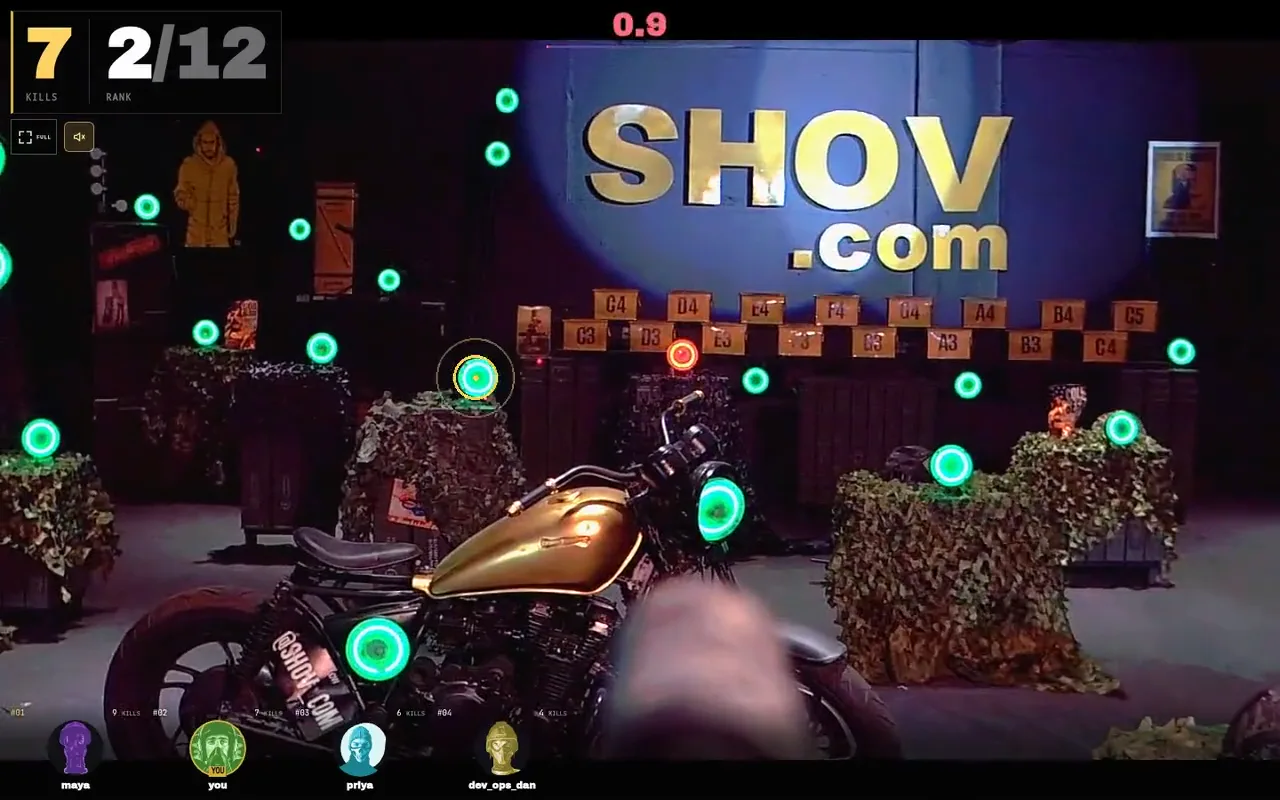
The onboarding welcome hour
Book one private hour on Shov for Groups for the cohort, their buddies and their managers. The arena runs 40 matches of 90 seconds back to back, with up to 12 players in each match, so a cohort of 10 with 10 buddies rotates through the lobby queue for repeated turns. The hour is a fixed $2,000 for the whole group, whatever the headcount.
- matches in one hour
- 40
- available player slots, including repeats
- 480
- players in each match
- 12
- fixed price for the hour
- $2,000
Shov is a real gun turret range in the United States that runs 24/7. Each turret fires less-lethal .68 caliber rounds at sensor targets, and a sensor-confirmed impact on an active green target counts as a kill. Players aim by clicking or tapping a target in the live scope view; the turret turns and fires. There is nothing to install: the event link opens in Chrome, Safari, Edge or Firefox on a phone or laptop.
Why a new-hire cohort needs something other than an intro call
A first-week video call asks new people to talk about themselves to strangers. A gun turret match gives them something to do together instead: a target to hit, a score to chase and a reason to message the person who just beat them. Buddies and managers join the same welcome hour and may share matches with the new hires when they queue at the same moment, so the cohort meets the people they will work with while everyone is looking at the same range.
Up to 12 people play in each match. After a match a player returns to the lobby and sits out the next one before queueing again, so each player can play at most once every two 90-second matches: a turn about every 3 minutes at best, or about 20 of the 40 matches if everyone keeps queueing. Waits can be longer depending on the queue. The 480 player slots in the hour are available capacity, including repeat turns, not guaranteed turns.
Who to invite and how to pair them
| Group | Role in the hour | Organiser's job |
|---|---|---|
| New hires in the cohort | Play; chase the leaderboard; ask their buddy anything | Send the event link with the start time in each person's named time zone |
| Onboarding buddies | Play in the same hour; queue at the same moment as their new hire (a shared match is not guaranteed); explain the controls once; keep the company call open | Pair each new hire with one buddy in the invitation |
| Hiring managers | Join the first and last ten minutes; play at least one match | Ask managers to post one line in the channel after their match |
| People team | Host: scoring rule, leaderboard call-outs, closing message | Own the invitation, the channel and the follow-up |
Pair people deliberately. Put each new hire and their buddy in the same company call, and ask them to rejoin the lobby queue at the same moment. Shov fills each match from the lobby queue and does not assign named players to a match, so a shared match is not guaranteed; the pair still watch the same leaderboard and talk in the same call. The leaderboard ranks every player in the booking across the whole hour.
The hour, minute by minute
| Clock | What happens | Organiser's job |
|---|---|---|
| Before the hour | Everyone has the event link and the company call link; joining opens at the booked start | Post both links, the start time with time zone and the buddy pairs in the onboarding channel |
| 00:00 to 00:05 | The window opens and the first match starts on the booked minute; buddies queue with their new hire | Say the scoring rule once: tap green targets, sensor-confirmed hits count |
| 00:05 to 00:50 | Matches run back to back; players sit out one match after each turn and queue again | Call out the top three every ten minutes and name the new hires on the board |
| 00:50 to 01:00 | The last matches of the forty; the leaderboard settles | Ask each manager to post one line about their match in the channel |
| After 01:00 | Players have been emailed a highlight reel after each match; the organiser receives the recap video, event page and leaderboard image once those assets are ready | Post the leaderboard image in the cohort's channel when it arrives and pin it for the week |
What it costs, and the longer windows
| Private window | Price, USD | Arena matches | Player slots, including repeats |
|---|---|---|---|
| 1 hour | $2,000 | 40 | 480 |
| 4 hours | $4,000 | 160 | 1,920 |
| 8 hours | $7,000 | 320 | 3,840 |
One hour covers a cohort welcome. A company that onboards a large intake, or wants several cohorts and their teams to drop in across a working day, uses the 4- or 8-hour window and the same single event link. Choose the window, a date and an available start on Shov for Groups, then complete verified-email checkout and payment; the paid booking's event link goes in your onboarding invitation. Book the welcome hour
The message to send in week one
Welcome to the team. On [day] at [time, named time zone] the whole cohort, your onboarding buddies and your managers have a private hour on real gun turrets. Open the event link on your phone or laptop, tap the green targets, and see if you can out-score your buddy on the leaderboard. Rounds last 90 seconds and run all hour. After each turn you sit out one match, then rejoin the lobby queue for another. Your buddy is [name]; they will be in the company call with you.
Replace the bracketed fields from the paid booking and your pairing list. If the cohort spans regions, choose a start inside the working day for the largest group and give each person their local time; the arena itself runs 24/7.
After the hour
Each player is emailed a highlight reel after each match, and after the session the organiser receives a recap video, an event page and a leaderboard image. Pin the leaderboard in the cohort's channel for the first week; it gives new hires a shared reference with the people they just played against. A repeat hour for the next cohort is booked the same way.
For a cohort that joins alongside a whole-company event, use the invitation kit and the player briefing so new hires get the same instructions as everyone else. Company event player briefing
FAQ
How many new hires can join one welcome hour?
There is no per-person charge, so the cohort, buddies and managers all join on the same event link. Up to 12 people play in each of the 40 matches; larger groups rotate through the lobby queue and wait in the lobby between turns. Bookings cover 2 to 1,000 expected people.
Can a new hire and their buddy play in the same match?
It is not guaranteed. Shov fills each match from the lobby queue and does not assign named players to a match. Ask buddies to coordinate through the company call and rejoin the lobby queue at the same moment; they share the same leaderboard whichever match they land in.
Is the price per person?
No. The hour is a fixed $2,000 for the whole private arena window. The headcount you enter is the expected audience, used for planning.
What does a new hire need?
A phone or laptop with Chrome, Safari, Edge or Firefox and a stable connection. Nothing to install. The organiser posts the event link, the start time in a named time zone and the company call link.